
Rhythm Studio1.11 - App Store
You'll be able to see results in few seconds.
Publisher Description
Now with Audiobus 2!
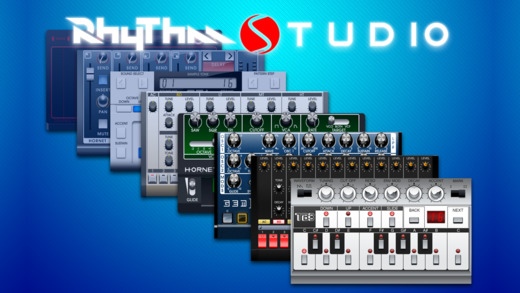
Rhythm Studio is a must have app for musicians! It is a premier universal electronic music making app, boasting richly detailed graphics and incredible sound, with impeccable recreations of classic synths and drum machines along with other amazing studio hardware.
-=-
"Dance Music has been riding a heavy old-school wave, of which the 303's resurgence is part... The 303 sound is also finding its way into a lot of pockets, thanks to Pulse Code..." - Michaelangelo Matos, SPIN Magazine, August 2011 print issue.
-=-
What makes Rhythm Studio stand out?
Rhythm Studio balances advanced music making features by using an easy to understand interface resembling real instruments. This means that one button does one thing just like it would with real hardware. Knobs turn, switches slide, and buttons press. You won't get lost in abstract interfaces, menus, or design.
Imagine having a studio of rare vintage synths and drum machines in the palm of your hand. Beautifully rendered synthesizers make seeing the app as enjoyable as hearing it. Rhythm Studio is the next best thing to having the real hardware.
Rhythm Studio allows you to make music the way you want to by giving you three different ways to create your song.
1. Use the step sequencer like the real hardware.
2. Use the Control Pad to play the synths live.
3. Instantly create a random pattern.
-=-
FEATURES:
Dynamic workspace full of awesome audio gear
Full multi-touch support for moving lots of controls
Up to any 4 instruments per song
Audio Paste export
WIST support
Background audio supported on multi-tasking iOS devices
Robust pattern and song sequencer
3 easy methods to making your songs
Recreation of classic drum machines
Recreation of classic synthesizers
6 synths, 2 drum machines, & 15 effects
INSTRUMENTS:
TB-3 - The classic 303 acid synth reborn
DR-8 - Uncanny reproduction of the monster 808
DR-9 - The 909 drum machine
Phoenix - A synthesizer dedicated to the famous supersaw
FM-3 - A three operator FM synth with feedback
Gemini - A two oscillator monster synth with 24db filter
Hornet - A ribbon style synth with character
ST-1 - A sample based synth with a VL-1 look
Mixer - Four channel mixer with send and insert effects
Control Pad - jam live with this X/Y controller
SEND FX:
Delay
Flanger
Chorus
Phaser
D-Verb
S-Verb
INSERT FX:
Distortion
Foldback Distortion
Lo-Fi
Low Pass Filter
High Pass Filter
Gate
Amp Distortion
Equalizer
Auto Filter
-=-
COMMUNITY:
news: http://www.pulsecodeinc.com
website: http://www.pulsecodeinc.com/rhythm-studio
youtube: http://www.youtube.com/user/PulseCodeInc
-=-
SUPPORT:
If you experience any problems please try these troubleshooting tips:
1. Contact support at info@pulsecodeinc.com.
2. Turn off your device and turn it back on.
3. Install the latest firmware available for your device
Requires iOS 7.0 or later. Compatible with iPhone, iPad, and iPod touch.
About Rhythm Studio
The company that develops Rhythm Studio is Pulse Code, Inc.. The latest version released by its developer is 1.11.
To install Rhythm Studio on your iOS device, just click the green Continue To App button above to start the installation process. The app is listed on our website since 2011-08-08 and was downloaded 0 times. We have already checked if the download link is safe, however for your own protection we recommend that you scan the downloaded app with your antivirus. Your antivirus may detect the Rhythm Studio as malware if the download link is broken.
How to install Rhythm Studio on your iOS device:
- Click on the Continue To App button on our website. This will redirect you to the App Store.
- Once the Rhythm Studio is shown in the iTunes listing of your iOS device, you can start its download and installation. Tap on the GET button to the right of the app to start downloading it.
- If you are not logged-in the iOS appstore app, you'll be prompted for your your Apple ID and/or password.
- After Rhythm Studio is downloaded, you'll see an INSTALL button to the right. Tap on it to start the actual installation of the iOS app.
- Once installation is finished you can tap on the OPEN button to start it. Its icon will also be added to your device home screen.
Program Details
System requirements
Download information
Pricing
Version History
version 1.11
posted on 2011-08-08
Disclaimer
Official App Store Link
We do not host Rhythm Studio on our servers. We did not scan it for viruses, adware, spyware or other type of malware. This app is hosted by Apple and passed their terms and conditions to be listed there. We recommend caution when installing it.
The App Store link for Rhythm Studio is provided to you by apps112.com without any warranties, representations or guarantees of any kind, so access it at your own risk.
If you have questions regarding this particular app contact the publisher directly. For questions about the functionalities of apps112.com contact us.
